Illinois Withholding Allowance Worksheet Example
This guide makes the Illinois Withholding Allowance Worksheet easy and approachable! Discover how to fill out the worksheet step by step and see a real example that takes the guesswork out of your tax deductions.

Navigating taxes shouldn’t feel like a maze, especially with payroll forms like the Illinois Withholding Allowance Worksheet. In this comprehensive article titled “Illinois Withholding Allowance Worksheet Example,” we’ll break down the steps for completing the worksheet, using tax-smart keywords like Illinois withholding, personal allowance, dependents, payroll, and income tax. Whether you’re an employer, employee, or self-employed in Illinois, understanding the worksheet ensures the right amount of state income tax is withheld from your paycheck.
Overview: What Is the Illinois Withholding Allowance Worksheet?
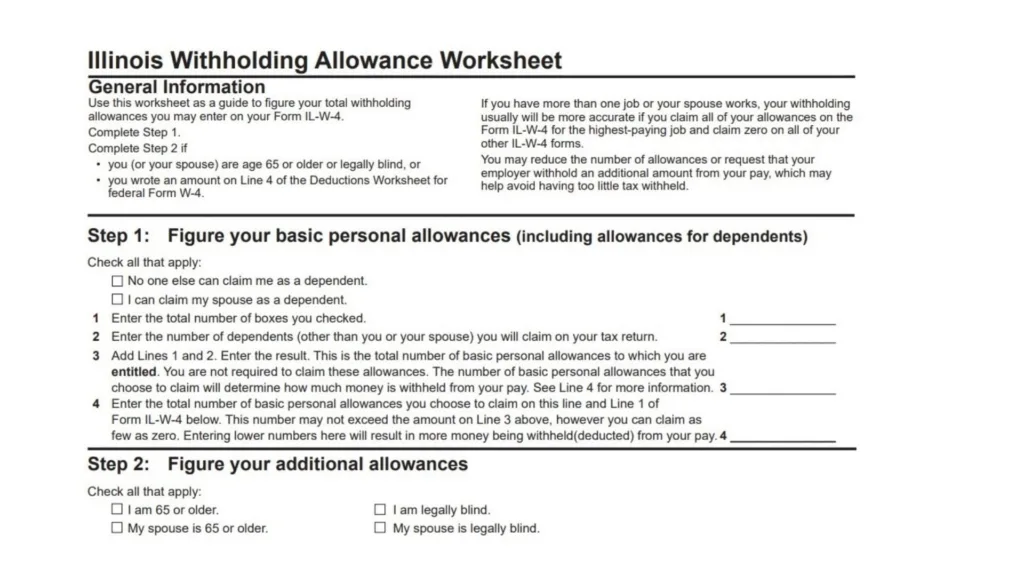
The Illinois Withholding Allowance Worksheet is part of Form IL-W-4, used to calculate how much state income tax should be withheld from your wages. When you start a new job or need to update your allowances, you’ll fill out this worksheet and hand it to your employer. Claiming the correct number of allowances directly impacts your take-home pay—claim too many and owe at tax time, claim too few and get a bigger refund later.

Step-by-Step: Illinois Withholding Allowance Worksheet Example
Here’s how to fill out a typical worksheet, with a real-life demonstration:
Step 1: Figure Your Basic Personal Allowances
Check all that apply:
- No one else can claim me as a dependent
- I can claim my spouse as a dependent
Suppose you check both boxes.
- Total boxes checked: 2
Next, number of additional dependents (kids, etc.):
2. Suppose you claim 2 dependent children: 2
Add lines 1 + 2 = 4
3. Total basic personal allowances: 4
Step 2: Elect Number of Allowances to Claim
You can choose any number up to 4. If you claim fewer than 4, more tax is withheld.
4. Number of allowances you wish to claim: 4
Step 3: Additional Allowances (if applicable)
Check all that apply:
- You are 65 or older
- Legally blind
- Spouse is 65 or older
- Spouse is legally blind
If none apply, skip this section.
Step 4: Submit Form IL-W-4
Transfer your chosen allowances to Form IL-W-4 and give it to your employer.
Sample Completed Worksheet
| Step | Description | Example Data |
|---|---|---|
| 1 | Basic boxes checked | 2 |
| 2 | Dependent children claimed | 2 |
| 3 | Total allowances (1 + 2) | 4 |
| 4 | Allowances to claim (up to 4) | 4 |
Result: Employee claims 4 allowances. Employer uses this number to determine how much Illinois income tax to withhold.
Why Does This Matter?
Accurately completing your Illinois withholding allowance worksheet prevents big surprises at tax time, smooths your payroll process, and helps you keep more of your paycheck all year long.
Payroll Table Example: Withholding Amounts
For weekly pay of $800 and 4 claimed allowances:
- Multiply line 1 allowances by $2,850
- Multiply line 2 allowances (if applicable) by $1,000
- Subtract total exemptions from wages, multiply result by Illinois tax rate of 4.95%
- Subtract and withhold accordingly
Common Mistakes & Tips
- Don’t claim more allowances than allowed
- Update your worksheet after life changes (marriage, children, new job)
- Double-check dependent claims
- Ask payroll or HR for guidance
- Keep a copy for your records
SEO-Friendly Related Keywords
- Illinois payroll allowance worksheet
- How to fill Illinois W-4
- Illinois state income tax form
- Claiming allowances on payroll
- Illinois tax withholding example
- Illinois W-4 instructions
- Employee withholding Illinois
Illinois Withholding Allowance Worksheet FAQs
Q1: What happens if I claim too many allowances?
A: You might owe Illinois income tax at the end of the year.
Q2: Can I claim zero allowances?
A: Yes! This will maximize the tax withheld—and likely increase your refund later.
Q3: When should I update my Illinois withholding worksheet?
A: Update after marriage, birth of a child, or any major life change.
Q4: Where do I find the Illinois W-4 form?
A: At the Illinois Department of Revenue website or from your employer.
Godspeed on your tax journey—now, you’re ready to handle Illinois withholding like a pro!


