How to Get 1095-B Form from Medicaid Online
Ready to conquer tax season? This guide turns the quest for your Medicaid 1095-B form into a breezy online “treasure hunt,” arming you with simple steps and digital shortcuts to find your proof of health coverage—without waiting on hold or checking your mailbox every day.

When tax season rolls around, one form often sends Medicaid recipients on a digital scavenger hunt: the legendary 1095-B form. But fear not—retrieving your 1095-B from Medicaid online doesn’t have to feel like searching for a mythical beast. In this comprehensive guide on how to get 1095-B form from Medicaid online, we’ll break down exactly what the 1095-B is, why your tax preparer might ask for it, and most importantly, the step-by-step process for accessing and downloading your IRS health coverage form directly from your state’s Medicaid website. From signing in with your Medicaid account to locating the correct section and navigating the portals, learning how to obtain your 1095-B electronically is easier (and faster) than you might think.
What Is a 1095-B Form and Why Does It Matter?
The 1095-B form is an IRS document that proves you and your household had Medicaid health coverage for part or all of the tax year. It’s your ticket to showing you met the minimum essential coverage requirements under the Affordable Care Act. While you aren’t required to send your 1095-B in with your tax return, having it handy is helpful for your records and peace of mind—especially if the IRS comes calling with questions.
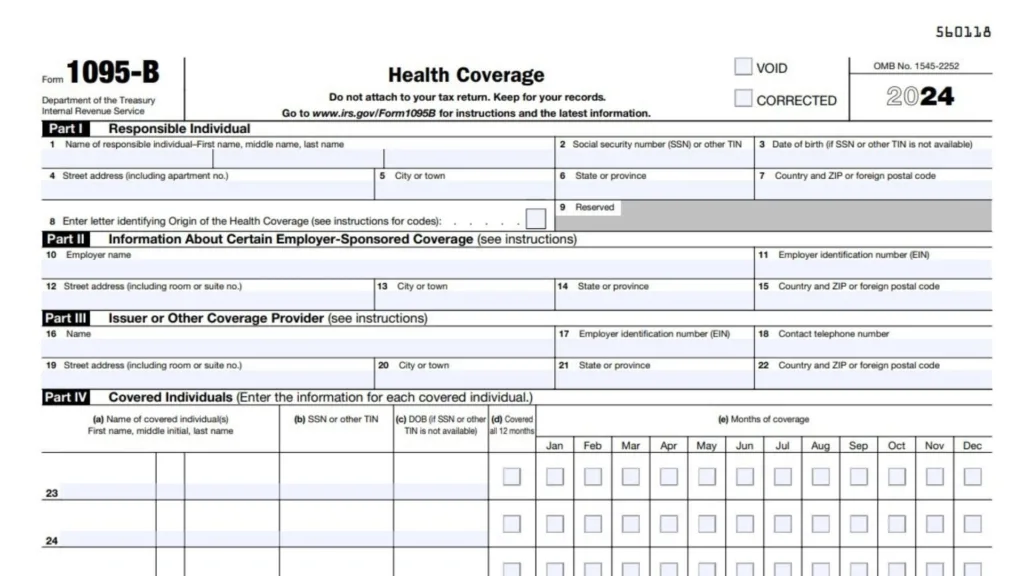
The Step-by-Step Guide: How to Get Your 1095-B from Medicaid Online
1. Grab Your Account Info
Most states deliver the 1095-B by request instead of sending it automatically. So, have your personal Medicaid account details (like member ID or SSN) ready for a secure sign-in. Some states use general portals (like mybenefits.utah.gov or a dedicated Medicaid site), while others direct you through email or a special online request form.
2. Visit Your State’s Medicaid Portal
- Go to your state’s Medicaid website or use a state-specific portal for health coverage documents.
- Look for a section called “Forms,” “Tax Information,” or “Documents.”
- Some states, like Utah, let you view and print your 1095-B directly by logging into your account and navigating to the “tax information” tab. Others require you to fill out an online request form first.
3. Submit an Online Request (if needed)
If your state doesn’t have the form instantly available, find and fill out their 1095-B request page. You’ll likely need:
- Your full name and date of birth
- Medicaid member ID or policy number
- Contact information (email, phone, and mailing address)
Check your state portal for specifics. Don’t email personal details like your Social Security Number unless the site specifically instructs you!
4. Download or Wait for Your Form
- If available online, click to download and save the PDF for your records.
- If not, you’ll receive your 1095-B by mail within a few weeks after your request.
- Still can’t find it? Contact your local Medicaid office or customer service hotline for direct help—they’re pros at guiding digital explorers!
Pro Tips for Finding Your Medicaid 1095-B Online
- Bookmark your state’s Medicaid member portal for easier access next year.
- If you moved recently, update your address in the system—forms mailed to old addresses can disappear into the void!
- Keep your form in a dedicated “Tax Stuff” folder on your computer for quick access.
- Some states let you request forms for past years—helpful if your accountant asks about a previous tax season.
Common Issues and Quick Fixes
- Didn’t receive your form? Double-check your contact info and spam folder if you asked for an emailed version, or call the support number on your Medicaid portal.
- Can’t log in to your account? Request a password reset or chat with your state’s Medicaid help desk—they’re used to handling account hiccups!
- Information on the form is incorrect? Contact Medicaid right away—they can fix errors and send you a corrected version.
FAQs
Q1: Do I need the 1095-B form to file my taxes?
A1: Nope! You don’t need to send the 1095-B in with your taxes, but hang on to it for your records in case the IRS needs proof of your health coverage.
Q2: Can I get a 1095-B form online for previous years?
A2: In many states, yes! Check the online portal or contact your state’s Medicaid office to request forms from earlier years.
Q3: What if I can’t find the online request option in my state?
A3: Reach out to your state Medicaid office by phone or mail; they’ll walk you through your options and make sure you get your form.


